

Understand the Wi-Fi signal around you.
SignallQ for Android measures actual radio power in dBm, identifies detected nodes, and shows the link speed negotiated with your router.
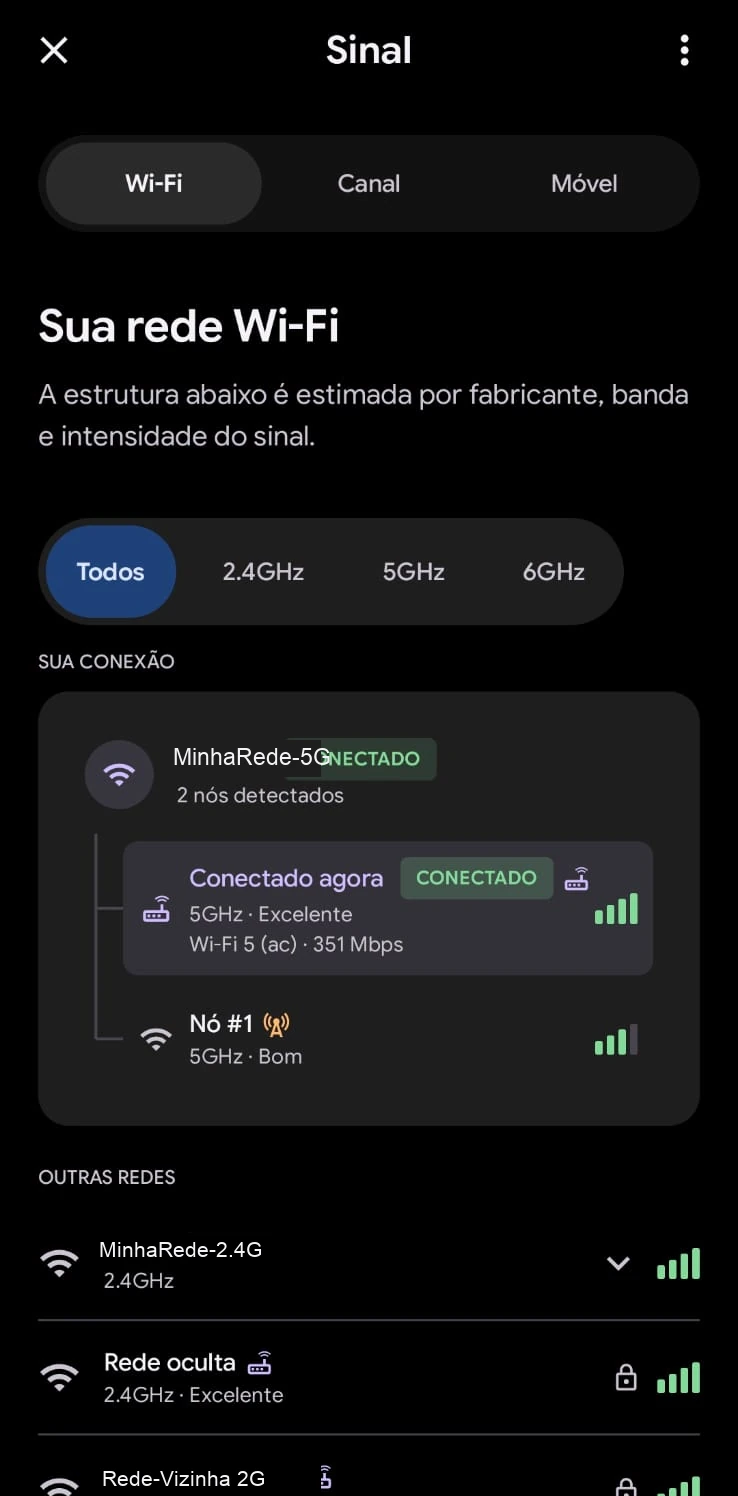
What this feature helps you find out.
Real radio power
Move beyond generic bars and see exactly how many dBm your phone receives in each room.
Nodes and repeaters
Find out whether you are connected to the main router or a distant repeater with weak signal.
Link speed
See the maximum rate negotiated between your phone and the router antenna.
How to use it in the SignallQ app.
Open Wi-Fi and mobile network
In SignallQ, open the radio diagnostics tool.
Open the Signal tab
The app reads frequency, Wi-Fi generation, and reception level.
Walk around your home
Monitor signal as you move away from the router to find weak spots.
Reading signal quality and its limits
The app collects data exposed by Android's Wi-Fi API.
The app estimates nodes using manufacturer data, signal strength, and bands broadcast by access points.
This is the theoretical physical radio capacity between your phone and the router antenna, not internet traffic.
Questions about this feature
What does signal strength in dBm mean?
dBm is the actual technical unit for radio power. Because it is a negative logarithmic scale, values closer to zero are stronger: -40 to -60 dBm is excellent, -65 to -75 dBm is fair, and below -80 dBm can cause frequent drops.
How does the app detect multiple Wi-Fi nodes?
On networks with repeaters, secondary routers, or mesh systems, SignallQ identifies access points broadcasting the same network name and shows which node your phone uses.
Why can phone signal bars be misleading?
System bars do not show the band or negotiated link rate. SignallQ shows actual dBm and link speed.
Does this work in a desktop browser?
No. Real dBm and network-node readings require direct Android hardware and location permission.
Other SignallQ Android tools
Sua internet continua oscilando? Descubra o motivo exato.
O SignallQ para Android analisa a saúde do seu Wi-Fi, interferências de canais, estabilidade de rota e equipamentos compatíveis com inteligência de diagnóstico.